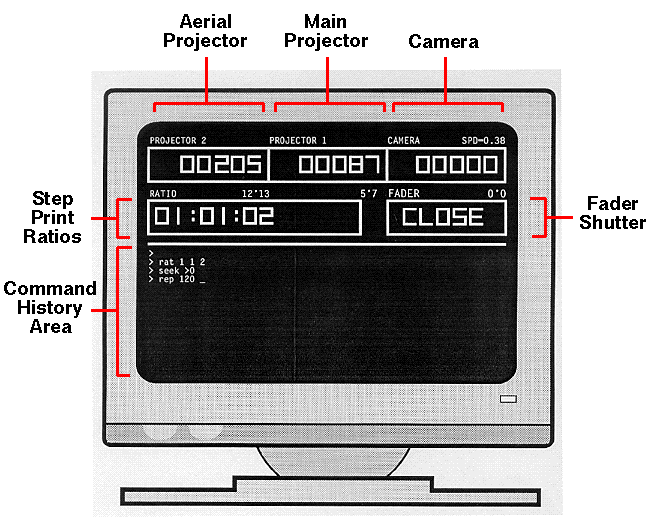
Screenshots: boot screen, screen counter sizes.
Two versions of OPCS are available:
However, people have been known to use microstepper drives from Superior Electric, Lynx Robotics, even custom drives; anything that use separate TTL logic level steps and direction inputs.
We supply the customer with the software, ample documentation, and phone support to help their onsite engineer retrofit their printers with stepper motors and drives. (OPCS is a software company only; we do not customize your hardware for you).
If you want to do heavy duty motion control stuff, you may want to additinally purchase the Kuper software to have on the system as well to do that kind of work. You can certainly have both the Kuper and OPCS software on the same DOS machine and controlled by both programs separately, without having to swap wires around.
Regarding motion control files, see the manual page for the OPCS feed command for more info about how OPCS does motion control, and for info about the ascii file format.
Originally OPCS was written on an Apple ][+ in BASIC in 1985 for California Institute of the Arts, to automate their single head JK printer. OPCS has since updated Calarts with the latest IBM PC version of the software.
In 1989, Pat Oneil of Lookout Mountain Films expressed an interest in this software, so it was rewritten for the IBM PC to control his single head printer, initiating the first commercial sale of OPCS as version 1.00.
Later it was modified to support multiple heads, Kuper RTMC16 card, homing, follow focus, color wheels and various other features, and most recently support for the RTMC48 card, and in 2008, the Kuper Controls "Industrial Card" (now available through General Lift).
With one line of commands they can do multiple cross dissolves, complex repeating operations, etc. which can keep the machine busy shooting while the operators are free to prepare for the next shot.
Some companies train their lineup people on the OPCS software, so that they can line up multiple shots onto a single roll, and create complex scripts for the camera operators to simply "load and run". These scripts can be created using either a text editor, or can use the OPCS software on a portable computer to let them create scripts offline, test them, then bring them in on a floppy for shooting the next day.
Setting up scripts allows operators to run very complex, unattended or interactive custom operations, minimizing mistakes. Scripts also makes it easy to reshoot complex shots, even modify them.
Advanced users have complimented on the software's open design that lets them tie in their own custom commands and/or DOS programs, making them accessible to the camera operators by extending the OPCS command set. This allows a shop to highly customize the software to their changing needs.
| To request a quote or ask questions, contact Greg Ercolano at |  |
See the sales page for pricing info.
| © Copyright 1997, 2010, Greg Ercolano. All rights reserved. To report documentation errors, send email to |

|